

Nothing disappears without a trace once it’s on the Internet. So, is it possible to find an Instagram story that was deleted or expired, or is it gone forever? Well, it all depends on whether you were the one at the wheel, aka the account belongs to you, or you want to catch up with the deleted content of someone else’s profile.
Whether you missed something important, want to relive a memory, or just need to retrieve a deleted post, this guide covers three practical solutions to view deleted Instagram stories. These aren’t just existing in theory, they have worked for real users. Let’s dive right in.
Don’t Miss Out Anymore: Pro Tips to View Deleted Instagram Stories of Your and Others’ Profiles
We’ve all been there: you open Instagram a little too late, only to realize a story you wanted to see has already disappeared. Whether it was your own post that vanished before you could save it, or someone else’s story you missed, it can be frustrating knowing that content might be gone for good. The good news is that there is an Instagram deleted story viewer and other smart, reliable ways to recover or revisit deleted stories.
Stay one step ahead and never miss a moment again.
1. Check Instagram’s Archive Feature
If you’re trying to view deleted Instagram stories or expired stories that belong to you, the Instagram Archive is your best friend. Since mid-2018, Instagram automatically saves stories to a private archive once they disappear from your public profile.
Make sure you’re viewing the Stories Archive tab. You can toggle between Posts, Stories, and Lives at the top. From here, you can scroll through your past stories – even ones that are no longer visible to followers. This includes stories that were deleted or simply expired after the usual 24 hours. You’ll also have the option to reshare, highlight, or download them.
How to Use It:
-
Open Instagram and go to your profile.
-
Tap the three lines (hamburger menu) in the top-right corner. Select Archive.
-
Instagram’s Archive is automatically enabled unless you’ve manually turned it off. It’s the most reliable method to recover deleted stories you’ve personally uploaded.
-
To make sure your stories are being archived automatically, go to: Settings > Privacy > Story > Toggle Save to Archive ON.
It’s far more intricate with stories posted and then archived by other IG users; that’s where an Instagram private profile story viewer can come in handy.
A pro-tip: screen record or screenshot
If you come across a story you think might get deleted soon – be it your own or someone else’s – grab a quick screenshot or use your phone’s screen recording feature.
2. Use Google Photos or iCloud Backup
Imagine you shared a story but removed it almost immediately, or perhaps it never got archived in the first place. Many use their phone’s camera to capture or edit the content, so there’s a good possibility that the original photo or video still exists. Usually, these files end up saved automatically in places like your device’s photo gallery, iCloud storage, or Google Photos.
How to Check:
On Android (Google Photos):
-
Open the Google Photos app.
-
Search by date or type “Instagram” in the search bar.
-
Look in the Videos or Screenshots folders.
On iPhone (iCloud/Photos App):
-
Open the Photos app.
-
Tap the Albums tab.
-
Check in the Recently Deleted, Videos, or Instagram folders.
-
Alternatively, use the search bar with keywords like “Story” or specific dates.
3. Check Out Third-Party Tools
There are plenty of reasons someone might want to revisit a story that’s no longer there. It’s not always about being nosy – sometimes, it’s practical. If you’re trying to view deleted Instagram stories you had no chance to watch, or if you want to revisit something they’ve already taken down, third-party apps and websites store Instagram stories for viewing, especially for public accounts.
Important: Always use a reputable Instagram private profile story viewer. While some apps provide legit services, others might unnecessarily ask for login credentials. Stick with platforms that don’t require you to log in.
One of such tools is Private Story Viewer, which stands out for its simplicity, speed, and privacy. Its clean, browser-based interface makes it easy to navigate, and because it doesn’t leave a “seen” trace, it’s perfect for those who want to browse discreetly.
What Is Private Story Viewer and How Does It Work?
A browser-based and anonymous tool, Private Story Viewer lets users view Instagram stories without dealing with an app. It’s especially popular among those who want a no-frills way to check out stories without logging into their Instagram account. This private story viewer doesn’t require you to install anything or provide personal credentials – just enter the Instagram username you’re interested in.
Why Private Story Viewer Is Popular
One of the main reasons people turn to Private Story Viewer is for anonymous story viewing and to view private Instagram. On top of that, Private Story Viewer offers a discreet way to stay updated about all other content you encounter on the platform without leaving a digital footprint.
Indeed, there are moments when someone might need to access a deleted story:
-
Creators and influencers, for instance, often use stories for promotions, links, or analytics, and losing that content can disrupt strategy.
-
Small businesses rely on stories to engage followers, so a prematurely deleted post could affect outreach and sales.
-
Followers might simply miss something important – an event or update that was removed before they saw it.
-
Journalists may need deleted content to document breaking news or public statements.
-
For everyday users, sometimes it’s about memory – revisiting a funny clip or heartfelt moment that didn’t get saved.
Private Story Viewer is also handy for:
-
Viewing someone’s stories anonymously
-
Staying up to date with influencers, celebrities, or public pages without being noticed
-
Quietly checking posts from acquaintances or competitors
-
Accessing content from Instagram without using the app directly
Key Features of Private Story Viewer
Private Story Viewer is a streamlined tool packed with useful features for casual users, digital marketers, and content browsers alike. Here’s a closer look at what sets it apart:
-
View Posts, Stories, and Highlights – not just Stories. Private Story Viewer lets you scroll through public posts, bio links, highlights, even pinned content, and view deleted Instagram stories. You get a clean, organized view of the account without being distracted by Instagram’s algorithm or ads.
-
Anonymous Browsing: View Instagram content without the account owner knowing you’ve seen it.
-
No Login Required: Access profiles and stories without needing to sign in to Instagram.
-
Cross-Platform Compatibility: Works seamlessly on desktops, tablets, and smartphones.
-
Download Content: Save photos, videos, and stories directly to your device.
-
Support for Private Accounts: View content from private profiles without sending a follow request.
How to Use Private Story Viewer
-
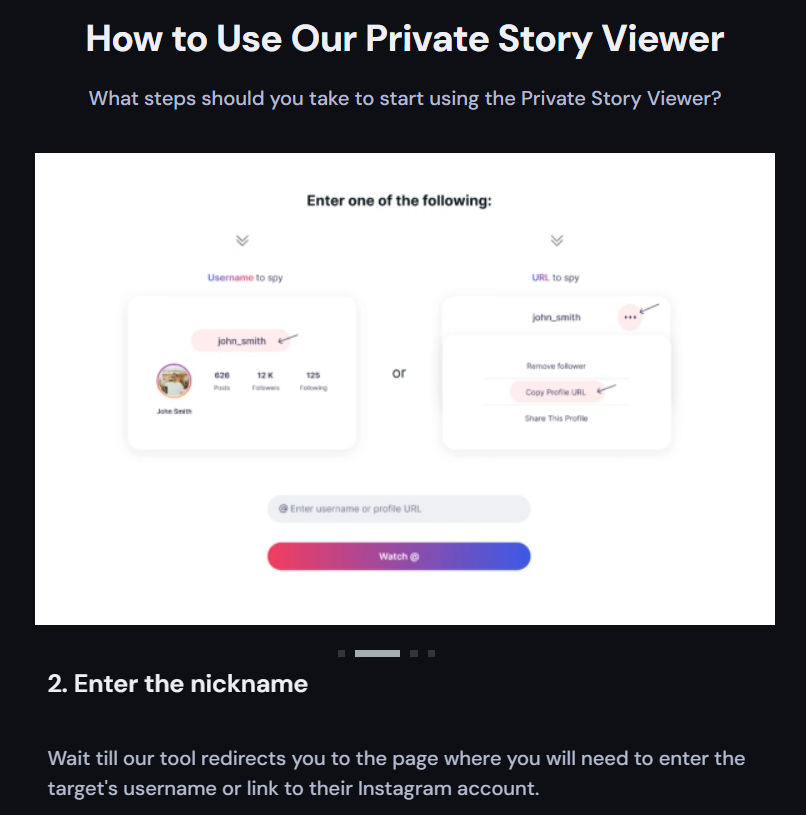
Start from the website PrivateStoryViewer.com.
-
Enter the Instagram username of the account you wish to view.
-
Subscribe and start browsing content such as posts, stories, and highlights anonymously.
-
Optionally save content to your device using the provided download options.
Final Thoughts
The desire to view deleted Instagram stories may arise not only out of curiosity – deleted content is equally important for creators, digital professionals, and casual users. Although Instagram stories are designed to be fleeting, that doesn’t mean they’re gone forever.
Private Story Viewer offers a smooth, no-hassle experience for quick, anonymous viewing, requiring no downloads or sign-ins. While this Instagram private profile story viewer won’t recover permanently deleted content, it’s a reliable tool for staying informed without leaving a digital footprint.