
Video ads are everywhere. They pop up on social media, websites, and even apps. Why? Because they work! Videos grab people’s attention and help businesses share their message. But creating video ads can feel overwhelming, especially if you have a small budget. Luckily, there are affordable and even free tools that can help you make amazing video ads without spending too much.
In this post, we’ll introduce you to some of the best tools, including free video editing software. These tools are easy to use and perfect for beginners.
So, let’s get in!
1. Start with Free Video Editing Software
The first step to creating a video ad is editing your video. Free video editing software like the CapCut desktop video editor helps you combine clips, add text, and make your video look professional.
How to Pick the Right Tool
Think about your needs. If you’re working on a computer and want lots of features, go for the CapCut desktop video editor. If you want something easy and quick, try Canva. All of these options are free, so you can test them and choose your favorite.
2. Use a Background Remover to Clean Up Visuals
A clean and attractive video is more likely to catch people’s attention. Sometimes, your video background might look messy or unprofessional. That’s where a background remover comes in handy. These tools let you erase the background and replace it with something better.
Why Use a Background Remover?
- Focus on Your Message: A clear background puts the spotlight on your product or service.
- Create a Professional Look: Even a basic video can look polished with a simple, clean background.
- Flexibility: You can add custom backgrounds that match your brand.
How to Remove Backgrounds from Videos
Here’s how you can remove backgrounds from videos using the CapCut desktop video editor:
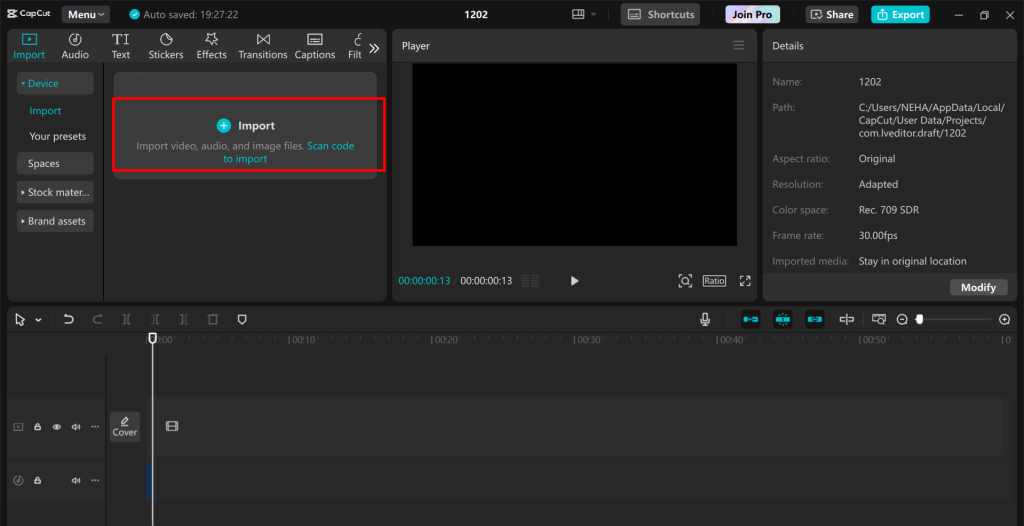
Step 1: Import Video
Start by uploading your video by clicking on Create Project > Import.
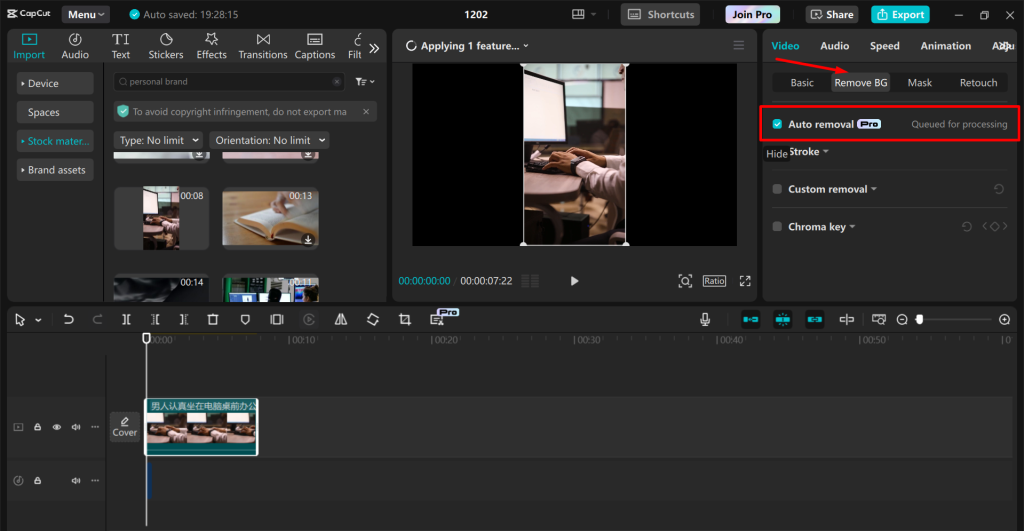
Step 2: Remove BG
Select your video then go to Video > Remove BG > Auto Removal. This will automatically detect your subject and remove the background of your video.
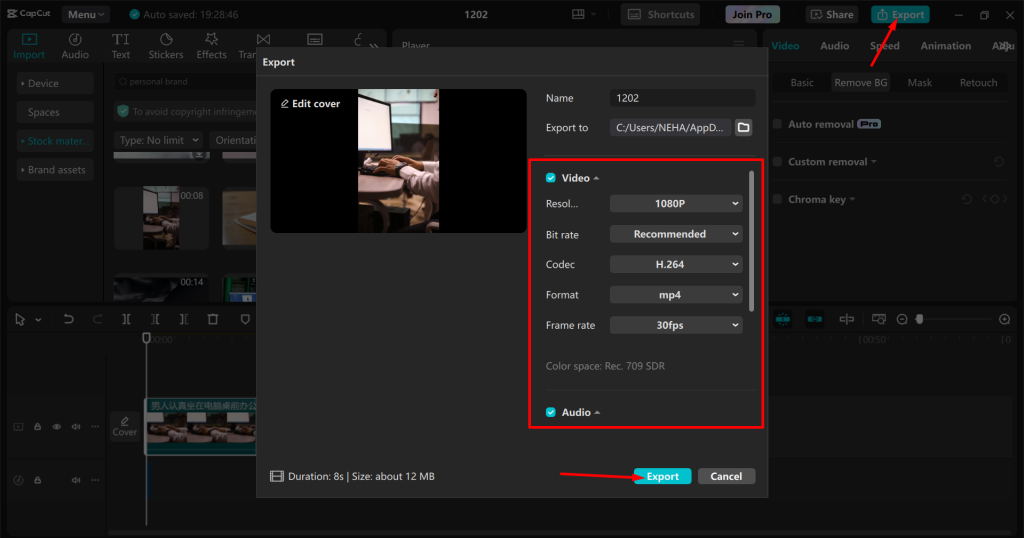
Step 3: Export Video
Finally, export your video by adjusting the rendering settings and clicking on the “Export” button.
Using a background remover can instantly make your video ad more eye-catching.
3. Add Voiceovers with Text-to-Speech Tools
Audio is an important part of any video ad. A good voiceover can make your ad more engaging and professional. But hiring a voice actor can be bit over a budget.. Instead, you can use a text to speech tool to create natural-sounding voiceovers.
Benefits of Text-to-Speech Tools
- Affordable: Most tools are free or cost much less than hiring a professional.
- Fast: You can generate a voiceover in minutes.
- Flexible: Choose from different voices, languages, and tones to match your ad.
Tips for Using Text-to-Speech
- Pick a voice that matches your audience. For example, a friendly and casual tone works well for social media ads.
- Combine the voiceover with captions. This makes your ad more accessible to everyone.
4. Bonus Tools to Boost Your Video Ads
In addition to editing software, background removers, and text-to-speech tools, there are other free tools that can help you improve your video ads:
- Stock Video and Music: If you need extra footage or music, check out free libraries like Pexels, Pixabay, and Artlist. These resources offer high-quality options that you can use in your ads.
- Subtitle Generators: Adding subtitles makes your video more engaging and ensures that people can understand it even without sound. Tools like Otter.ai and Kapwing can create subtitles for free.
- Analytics Tools: After you create your ad, track its performance using tools like Facebook Ads Manager or YouTube Analytics. This helps you see what’s working and what isn’t.
5. Tips for Getting the Most Out of Your Budget
Even with free tools, you should plan your video ad carefully to save time and money. Here are some tips:
- Storyboard Your Ideas: Before you start filming, sketch out a plan for your video. T This will help you stay attentive and avoid unnecessary edits.
- Learn Basic Skills: Spend some time learning how to use these tools. Many of them have tutorials online.
- Repurpose Content: Use the same video for different platforms by tweaking the format or length.
- Use Free Templates: Many tools offer free templates for ads. These templates save time and provide a professional look without needing advanced design skills.
- Collaborate with Friends or Colleagues: If you know someone with skills in video editing, voiceovers, or design, collaborate with them. This can save money while improving the quality of your video ad.
- Batch Your Content Creation: Record and edit multiple ads in one session. This saves time and helps you make the most of your tools by reusing setups, props, and ideas across different videos.
Conclusion
You don’t need a big budget to create amazing video ads. With tools like free video editing software, background removers, and text-to-speech programs, you can craft professional, engaging ads without spending a fortune. Whether you’re a small business owner or a beginner marketer, these tools make video creation easy and affordable.
Start using these tools today, and watch your video ads outstanding in the crowded digital world. With a little creativity and the right resources, you can turn your ideas into powerful ads that drive results.