
Imagine waking up to your phone buzzing relentlessly. You check your notifications and see a nightmare scenario for any business owner: a flood of 1-star Google reviews is hitting your profile, one after another. Your rating is tanking before your eyes.
Then, an email or WhatsApp message arrives. It claims responsibility for the attack and offers a "solution." If you pay them, the reviews stop. If you don't, they promise to destroy your online reputation completely.
This is not a customer service issue. This is a Google Review Scam, also known as review extortion. It is a digital protection racket designed to exploit your fear.
At Thodex, we understand that your online reputation is your livelihood. The panic you feel is real, but you must not act on it. Paying the ransom is the worst thing you can do. This guide will walk you through exactly how to spot the scam, secure your business, and fight back without losing your money.
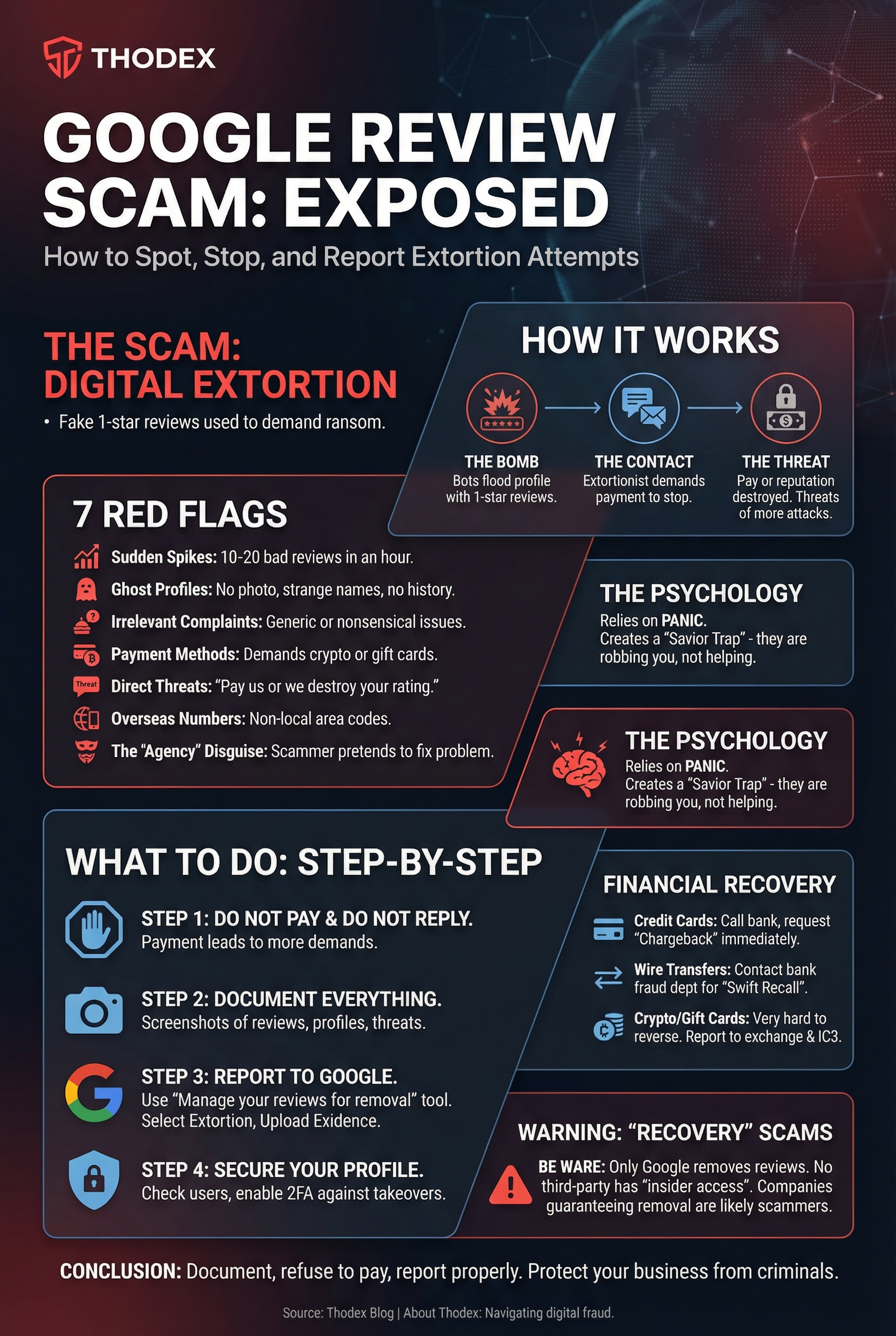
How the Google Review Extortion Scam Works
Scammers know that small businesses rely heavily on Google Maps and Search to get new customers. They use this dependency against you. The scam usually follows a simple, high-pressure three-step process:
1. The "Bomb"
The scammer uses a network of fake accounts (bots) to post a large number of 1-star reviews on your Google Business Profile in a very short time. These reviews often contain no text, or they post generic complaints that don't make sense for your business.
2. The Contact
Shortly after the attack starts—sometimes within hours—you receive a direct message. This could be an email, a text, or a WhatsApp message. The sender admits they posted the reviews.
3. The Threat
They demand payment to remove the negative reviews. They usually ask for payment in untraceable forms like Bitcoin, USDT (Tether), or digital gift cards. They threaten that if you don't pay, they will flood your profile with hundreds more negative ratings.
7 Red Flags You Are Being Targeted
It can be hard to tell the difference between an unhappy customer and a scammer when you are stressed. However, extortion attempts almost always have specific warning signs.
- Sudden Spikes: You normally get one or two reviews a week, but suddenly receive 10 or 20 bad reviews in a single hour.
- Ghost Profiles: The reviewers have no profile photos, strange names, and no history of reviewing other places.
- Irrelevant Complaints: The reviews complain about food when you run a mechanic shop, or mention employees who don't exist.
- Payment Methods: The person contacting you demands payment in cryptocurrency (Bitcoin/USDT) or gift cards (Amazon/Google Play). Legitimate businesses never ask for payment this way.
- Direct Threats: The message explicitly says, "Pay us or we will destroy your rating."
- Overseas Numbers: You receive WhatsApp messages or calls from area codes that are not local to your country.
- The "Agency" Disguise: The scammer pretends to be a "Reputation Management Agency" offering to fix a problem they secretly created.
Why This Scam is Dangerous (The Psychology)
Scammers rely on panic. They know that a drop in your star rating can hurt your revenue immediately. By attacking you quickly, they hope you will open your wallet before you have time to think.
They also set a "Savior Trap." By creating the problem and then offering to fix it, they try to look like the only people who can help you. This is a lie. They are not helping you; they are robbing you.
What To Do If You Are Targeted (Step-by-Step)
If you are in the middle of a review bomb attack, take a deep breath. Follow these steps immediately.
Step 1: Do Not Pay and Do Not Reply
This is the most critical rule. If you pay the ransom, the scammers will not leave you alone. They will mark you as a "soft target" and likely demand more money next week. Do not reply to their emails or messages, as this confirms your contact information is valid.
Step 2: Document Everything
You need proof to show Google and the authorities.
- Take screenshots of the 1-star reviews.
- Copy the URL (web address) of the fake reviewers' profiles.
- Take screenshots of the extortion emails or texts.
- Save the email headers if possible (this helps trace where the email came from).
Step 3: Report to Google (The Right Way)
Do not simply click "Flag as Spam" on the review and wait. That process is slow. Google has a specific tool for extortion.
- Go to the Google Business Profile Help page.
- Search for the "Manage your reviews for removal" tool.
- Select the reviews that are part of the attack.
- When asked for the reason, look for options related to Spam, Conflict of Interest, or specifically Extortion if available in the text box details.
- Upload your evidence. Provide the screenshots of the blackmail demands. This proves the reviews are fake and part of a crime.
Step 4: Secure Your Profile
Sometimes, scammers try to hijack your profile entirely. Log in to your Google Business dashboard and check the "Users" or "Managers" section. If you see any email addresses you don't recognize, remove them immediately. You should also ensure you are securing their accounts against ransomware and takeovers by enabling Two-Factor Authentication (2FA).
Financial Recovery: Can You Get Your Money Back?
If you already paid the scammers in a moment of panic, you might still be able to recover your funds, depending on how you paid.
- Credit Cards: Call your bank immediately. Tell them the charge was the result of extortion and fraud. Request a "chargeback." This is your best chance of recovery.
- Wire Transfers: Contact your bank's fraud department instantly. Ask for a "Swift Recall." If you act fast enough, they might be able to stop the transfer.
- Crypto and Gift Cards: Unfortunately, these payments are very hard to reverse. Scammers love these methods because they are instant and anonymous. You should still report the transaction to the exchange you used (like Coinbase or Binance) and the FBI's IC3. For more information on why these payments are risky, read about cryptocurrency scams you should avoid.
WARNING: Beware of "Review Removal" Recovery Scams
There is a secondary scam that targets victims of review bombing. You may find companies online or receive emails claiming they can "guaranteed" delete bad Google reviews for a fee.
Be very careful.
Only Google can remove Google reviews. No third-party agency has a "back door" or "insider access" to Google's servers. Anyone promising 100% removal is likely lying to get your money. Some of these agencies are actually run by the same people who attacked your profile in the first place. These are hidden cyber threats targeting your brand disguised as help.
Frequently Asked Questions (FAQ)
Can I disable Google Reviews temporarily?
No. Unlike some other platforms, Google does not allow businesses to turn off reviews. However, if you report a massive attack, Google may temporarily lock your profile to prevent new reviews from being posted while they investigate.
How long does it take Google to remove fake reviews?
It varies. It can take anywhere from a few days to a few weeks. If you provide proof of extortion (the threatening emails), the process is usually faster because it violates Google's zero-tolerance policy on harassment.
Is it illegal to buy 5-star reviews to fix my rating?
Yes. The Federal Trade Commission (FTC) has banned the sale and purchase of fake reviews. Buying positive reviews can get your business fined and your Google profile permanently suspended.
Conclusion
The Google Review Scam is frightening because it attacks your reputation, which feels personal. But remember: it is just a numbers game to the scammers. They are looking for easy victims who will pay without fighting back.
By documenting the attack, refusing to pay, and reporting the extortion properly to Google, you can protect your business. Do not let criminals dictate your worth.
About Thodex
At Thodex, we are dedicated to helping individuals and businesses navigate the complex world of digital fraud. From crypto recovery insights to scam prevention, our goal is to provide you with the knowledge you need to stay safe online. If you found this guide helpful, explore our other resources on protecting your digital assets.