In early 2024, a sophisticated phishing operation targeted the crypto community through malicious links that looked like legitimate minting sites. In just one month, over 57,000 users were hit, with $47 million in digital assets gone. The attackers didn’t hack the blockchain. They used search engine poisoning to rank fake sites at the top of Google, tricking people into signing malicious transactions.
This is why crypto wallet security matters. Transactions are permanent. No customer service. No refunds. No password reset button. When you sign that transaction, it’s done.
Most people learn about wallet security after losing their funds. They thought installing MetaMask was enough. They clicked “approve” without reading what they were signing.
This guide gives you 5 actions that actually protect your assets. You’ll learn which wallets to use, how to spot scams, and which tools catch threats you miss.
Understanding Wallet Types First
Hot Wallets vs Cold Wallets: The Truth

Hot wallets like MetaMask, Trust Wallet, and Phantom stay connected to the internet. They’re convenient for daily transactions and interacting with dApps. But that constant connection makes them vulnerable to phishing, malware, and remote attacks. Treat hot wallets like the cash in your physical wallet. Only keep what you need for immediate transactions.
Cold wallets like Ledger and Trezor store your private keys completely offline. The keys never touch the internet, making remote attacks impossible. They’re the safest option for serious holdings but not convenient for frequent trading.
Here’s the critical rule: buy cold wallets ONLY from official manufacturers. Never from Amazon, eBay, or third-party sellers. Compromised devices with pre-installed malware have been sold on secondary markets. Go directly to Ledger.com or Trezor.io.
The strategy: use cold wallets for assets you plan to hold long-term. Use hot wallets only for active trading and dApp interactions with amounts you can afford to lose completely.
Step 1: Protect Your Seed Phrase Like Your Life Depends On It
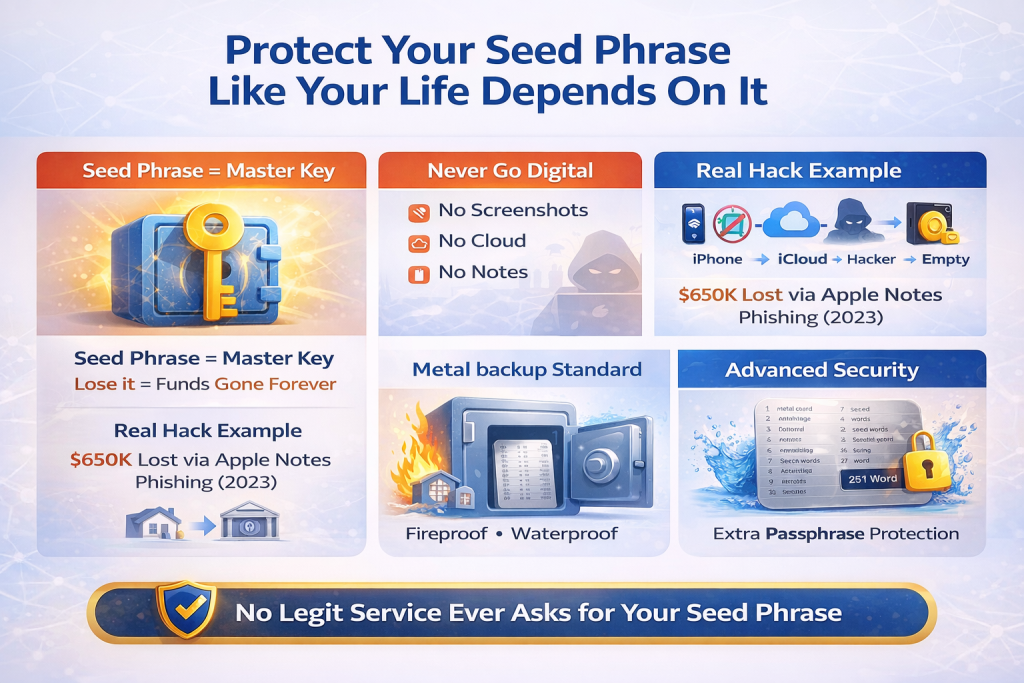
Your seed phrase (technically a BIP-39 mnemonic) is the master key to everything. Lose it and your crypto is gone forever. Someone else gets it and they own your wallet instantly.
Never Go Digital
No screenshots, no cloud storage, no password managers. Modern “infostealer” malware automatically scans your computer for strings of 12 or 24 words matching the BIP-39 word list. If it exists on your device, it’s findable.
In 2023, a MetaMask user lost $650,000 after storing their seed phrase in Apple Notes. One iCloud phishing attack later, hackers searched “seed phrase” in the notes and drained the wallet within minutes.
The Metal Standard
Paper burns at 451°F. House fires reach 1,100°F. Use steel backups like Cryptosteel or Billfodl that survive floods and fires. Store two copies in different physical locations: home safe and bank vault.
Advanced: The “25th Word” Passphrase
Add a custom passphrase to your 24-word seed. Even if someone steals your metal backup, they can’t access funds without that extra word.
The Golden Rule: Legitimate services never ask for your seed phrase. No exceptions.
Step 2: Use Cold Storage and Layer Your Wallets by Purpose
When Cold Wallets Are Non-Negotiable
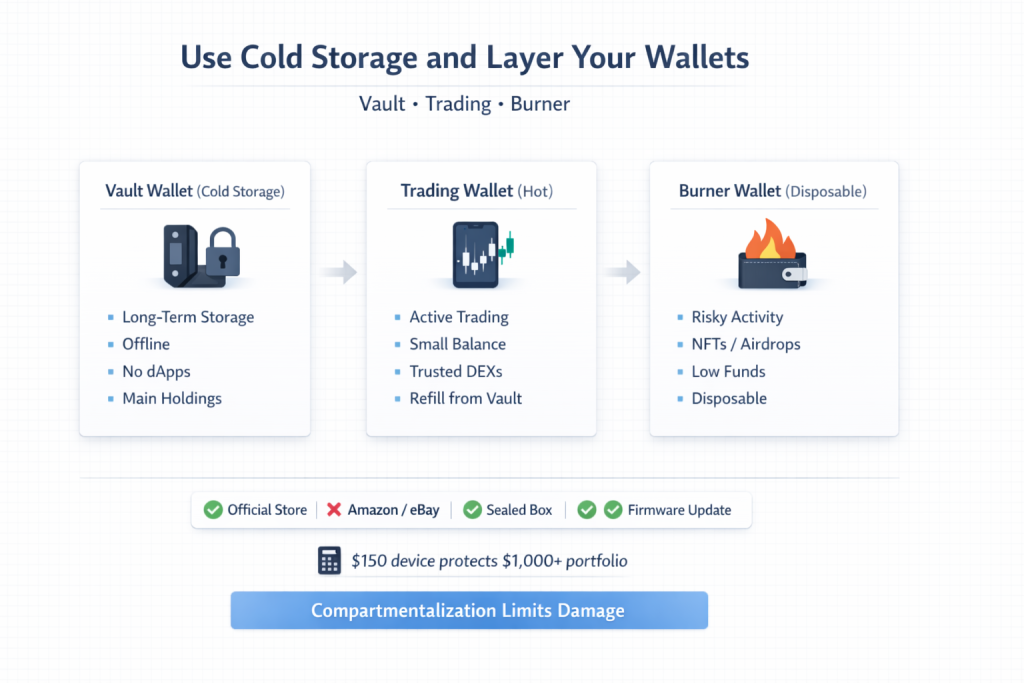
Hardware wallets like Ledger and Trezor keep your private keys completely offline. While many suggest the $5,000 threshold, professional traders invest in cold storage once their portfolio hits $1,000. A $150 device protecting $1,000 is a 15% insurance premium. Protecting $5,000? That’s only 3%.
Buy ONLY from official sources: Ledger.com or Trezor.io. Never Amazon or eBay. Supply chain attacks are real. Scammers have included scratch-off cards with pre-generated seed phrases in tampered boxes. Real Ledger or Trezor devices never come with pre-generated seeds. Verify packaging is sealed and update firmware immediately.
The Three-Wallet Strategy
Vault Wallet (Cold Storage): Your main holdings. Hardware wallet only. Never connect to websites. Never sign approval transactions. Only send and receive native tokens like BTC or ETH.
Trading Wallet (Hot): Small amounts for active trading. Connected only to trusted DEXs. Replenish from the vault as needed.
Burner Wallet (Disposable): For risky activities like new NFT mints, unknown airdrops, or testing dApps. Fund with only what the transaction needs. If compromised, you lose $50, not $50,000.
Why this works: compartmentalization limits damage. One compromised approval doesn’t wipe your entire portfolio.
Step 3: Enable Strong Authentication and Password Security
Password Hygiene Matters
Every exchange and wallet service needs a unique password. Password reuse is how attackers chain breaches. They buy leaked credentials from one site and test them everywhere else.
Use a password manager like Bitwarden or 1Password to generate 20+ character random strings. This length provides brute force resistance against modern cracking tools. Never use birthdays, names, or simple sequences.
Two-Factor Authentication: Not All Methods Are Equal
Enable 2FA everywhere, but the method matters. SMS-based 2FA is vulnerable to SIM swap attacks. In 2025, coordinated SIM swap operations hijacked phone numbers to intercept SMS codes. The FBI reported hundreds of millions in losses. Once attackers controlled the number, they drained centralized exchange accounts within minutes.
Use authenticator apps like Google Authenticator or Authy instead. These generate time-based codes locally that can’t be intercepted.
For high-value accounts, consider hardware security keys like YubiKey using FIDO2 protocol. These are truly phishing-resistant. Even on a fake site, the YubiKey requires a physical cryptographic handshake that fraudulent sites cannot replicate.
The Biometric Layer
Fingerprint and face recognition add convenience but should supplement strong passwords and 2FA, not replace them.
Step 4: Add Automated Protection Layers
Why Manual Vigilance Fails
You’re excited about an NFT drop. You’re rushing to catch a price dip. These are exactly when scammers strike. Phishing sites look identical to legitimate platforms. One moment of distraction equals complete wallet drain.
The Zero-Day Problem
Most security extensions rely on blacklists of known bad sites. Scammers bypass this by creating “zero-day” phishing sites that only exist for 2-3 hours, too fast for blacklists to update.
Real-Time Transaction Scanning
Advanced protection tools like Kerberus use heuristic analysis to spot scams based on behavior, not just known names. The system scans websites before you connect your wallet and analyzes smart contracts in real-time.
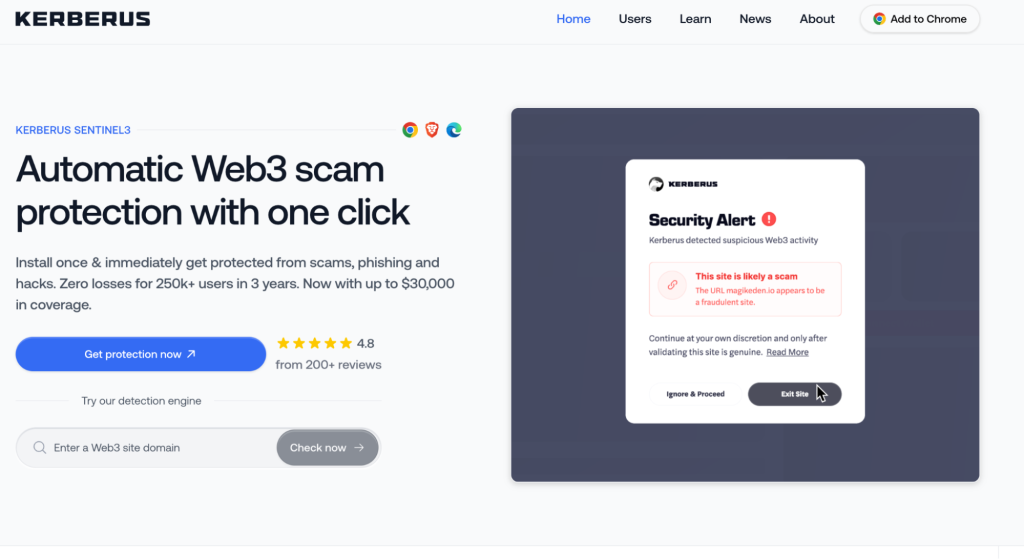
Most users can’t read bytecode. When a malicious contract requests “setApprovalForAll,” these tools translate it into plain language: “This site is asking permission to take ALL your NFTs.” Coverage spans 1000+ chains including Ethereum, Base, Polygon, and Solana.
Some platforms provide financial backing with up to $30,000 in USDC coverage if detection misses a threat. This separates quality tools from competitors offering only warnings.
Installation takes under five minutes and runs silently until blocking an actual threat.
Step 5: Master Transaction Hygiene and Regular Maintenance
Before Every Transaction
Verify the URL completely. Phishing sites buy Google ads to rank first for searches like “Uniswap” or “OpenSea.” Check for special characters like “unîswap.” This is called a Punycode attack where underlying code differs even when it looks identical. Bookmark legitimate sites and only access through bookmarks.
Read what you’re signing. Transaction simulators like Pocket Universe or Fire show exactly what happens before you sign. If you don’t understand it, don’t approve it.
Verify addresses character-by-character. Address poisoning uses vanity address generators to create fake addresses with the same first 5 and last 5 characters as yours. Checking only the ends isn’t enough anymore. Never copy from transaction history. Always verify the complete middle section.
Revoke Old Approvals Monthly
Every dApp interaction grants token spending permissions that stay active forever until manually revoked. A site you used legitimately in 2024 gets hacked in 2026. The hacker uses your 2024 permission to drain your wallet.
Visit Revoke.cash or Etherscan’s approval checker monthly. Revoke permissions for unused protocols, abandoned projects, or anything unrecognized. Five minutes prevents catastrophic losses.
Conclusion
Crypto wallet security comes down to five essentials: protecting your seed phrase offline, using cold storage for significant holdings, enabling strong authentication, adding automated protection layers, and maintaining regular transaction hygiene.
Most hacks don’t break encryption or exploit blockchain vulnerabilities. They exploit human mistakes. Reused passwords. Phishing clicks. Unlimited approvals granted without reading. Seed phrases stored in cloud storage.
The good news? These are all preventable. Close these basic gaps and you’re ahead of most crypto users.
Start with the fundamentals today. Secure your seed phrase properly. Move serious holdings to hardware wallets. Enable authenticator-based 2FA. Bookmark legitimate sites. Check what you’re signing before approving.
Your crypto has no safety net. Transactions are permanent. There’s no customer service to call. No refunds for mistakes.
That makes security non-negotiable. The effort you invest today protects everything you’ve built.