

You handle your phone with care. You likely only download apps from the official Apple App Store or Google Play Store because you trust their security reviews. However, a recent alert where the FBI warns iPhone Android scams are bypassing these security measures has changed the landscape of mobile safety.
Scammers have discovered a “backdoor” into your phone using legitimate developer tools. By posing as beta testers, criminals are stealing millions in cryptocurrency from unsuspecting victims.
If you have recently downloaded a “testing” version of a trading app, or met someone online who encouraged you to download an app that wasn’t officially released yet, you need to read this guide immediately.
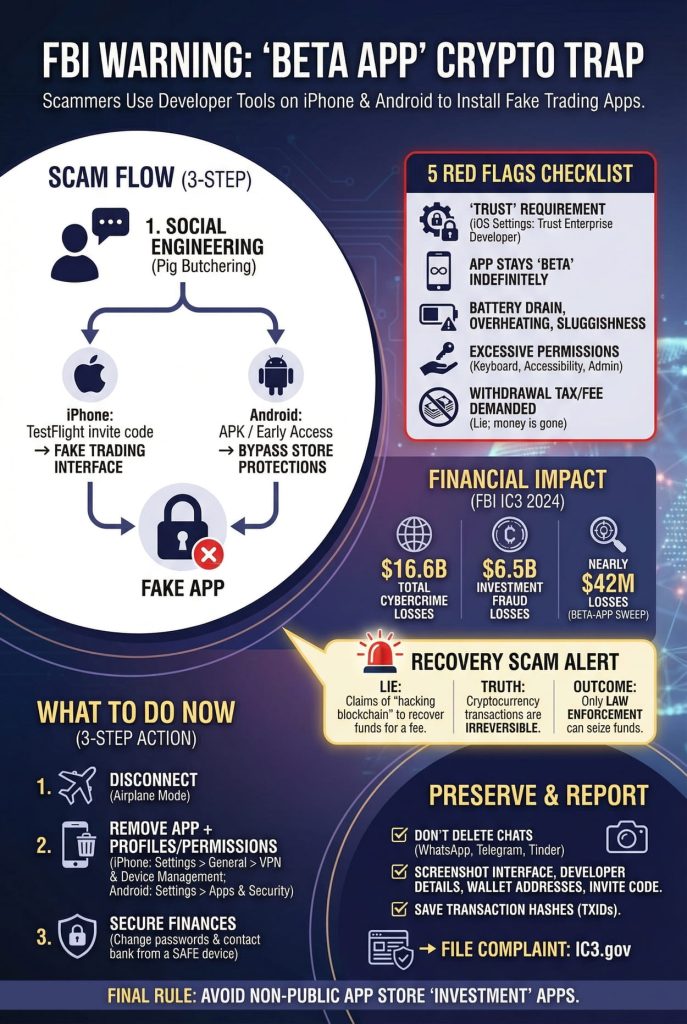
The “Beta Testing” Loophole: How It Works
Most people assume that if an app is on their iPhone, Apple must have approved it. Usually, that is true. But scammers are now exploiting a feature designed for app developers to sneak malware onto your device.
1. The Setup (The “Pig Butchering” Method)
It rarely starts with a tech pitch. It usually starts with a “wrong number” text or a match on a dating app like Tinder or Bumble. The scammer spends weeks building a friendship or romantic relationship with you. This is called “pig butchering”—fattening up the target before the slaughter.
Eventually, they mention they are making huge profits on a new cryptocurrency exchange. They claim they have “insider access” to a beta version of the app and offer to get you in.
2. The iOS Exploit (TestFlight)
If you have an iPhone, the scammer will ask you to download an official Apple app called TestFlight.
TestFlight is a legitimate tool developers use to test apps before they are released to the public. Apple does not review apps inside TestFlight as strictly as they do for the public App Store.
The Trap: The scammer sends you an invitation code. You enter it into TestFlight, thinking you are getting early access to a premium trading platform. In reality, you are downloading a fake interface designed to steal your money.
3. The Android Exploit (Sideloading)
For Android users, the process is slightly different but equally dangerous. Scammers will send you a direct link to download an “APK” file, or invite you to an “Early Access” track. This bypasses the Google Play Store’s safety filters entirely.
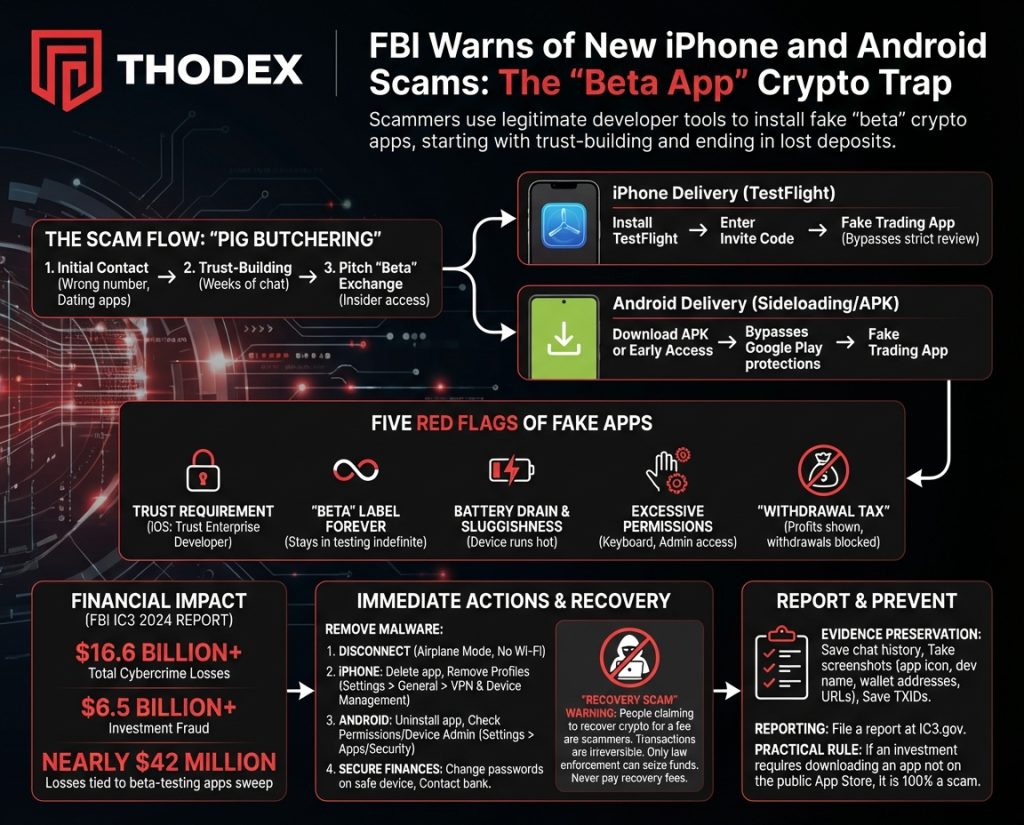
5 Critical Red Flags of a Fake Trading App
How do you know if your trading app is a tool for fraud? Look for these five warning signs.
- 1. The “Trust” Requirement (iOS): This is the biggest red flag. If the app instructions tell you to go to Settings > General > VPN & Device Management to manually “Trust” an Enterprise Developer, stop immediately. Legitimate apps never require this step.
- 2. “Beta” Label Forever: The app claims to be in “testing” or “beta” mode indefinitely. Real companies want to launch their apps publicly; scammers keep them in beta to avoid security audits.
- 3. Battery Drain & Sluggishness: Does your phone feel hot? Is the battery dying halfway through the day? FBI research suggests these apps often run malicious code in the background, mining crypto or stealing data, which kills your battery.
- 4. Excessive Permissions: A trading app needs internet access. It does not need access to your keyboard, Accessibility Services, or Admin privileges. If it asks for these, it is trying to record your passwords.
- 5. The “Withdrawal Tax”: You see profits on the screen. But when you try to cash out, the app freezes. Customer support tells you that you must pay a “tax” or “fee” to release the funds. This is a lie. The money is already gone; they are trying to steal more.
The Financial Impact
The numbers are staggering. According to the FBI IC3 2024 Annual Report, total cybercrime losses exceeded $16.6 billion.
Investment fraud was the leading cause of these financial losses, accounting for over $6.5 billion. In a specific sweep targeting these beta-testing apps, the FBI identified nearly $42 million in losses from just a small group of victims. These are not small-time thefts; they are life-altering financial crimes.
Immediate Action: How to Remove the Malware
If you suspect you have downloaded one of these apps, deleting the icon from your home screen is not enough. You must remove the underlying permissions.
Step 1: Disconnect and Isolate
Immediately turn on Airplane Mode or turn off your Wi-Fi and Cellular Data. This cuts the connection between your device and the scammer, stopping them from stealing more data.
Step 2: Delete the App and Profiles
For iPhone Users:
- Delete the app icon as usual.
- Crucial Step: Go to Settings > General > VPN & Device Management.
- Look for a “Configuration Profile” or “Enterprise App” that you don’t recognize.
- Tap it and select Remove Profile. If you skip this, the hackers may still have access to your phone.
For Android Users:
- Go to Settings > Apps and uninstall the malicious app.
- Go to Settings > Accessibility and ensure the app didn’t grant itself special control.
- Check Device Admin Apps in your security settings and revoke permissions if the app is listed there.
Step 3: Secure Your Finances
Using a different device (like a laptop or a partner’s phone) that is safe:
- Change the passwords for your email, bank accounts, and legitimate crypto exchanges immediately.
- Contact your bank to report the fraud.
⚠️ WARNING: The “Recovery” Scam
This is the most important warning in this article.
If you post about losing money on social media (Reddit, X/Twitter), you will be contacted by bots or people claiming to be “ethical hackers” or “recovery experts.”
They are lying.
- The Lie: They claim they can “hack the blockchain” or use special software to get your crypto back for a fee.
- The Truth: Cryptocurrency transactions are irreversible. No private individual, company, or hacker can reverse a transaction.
- The Outcome: If you pay them, they will steal that money, too.
Only law enforcement can seize funds. Never pay a fee to someone promising to recover lost money.
Evidence Preservation Checklist
Before you wipe your phone completely, try to save evidence for the police.
- Do NOT delete the chat history with the scammer (WhatsApp, Telegram, Tinder).
- Take Screenshots of:
- The app icon and interface.
- The developer name in your Settings.
- Wallet addresses you sent money to.
- The URL or invitation code used to download the app.
- Transaction Hashes: Locate the Transaction IDs (TXIDs) from the platform you used to send the money (e.g., Coinbase, Binance).
Frequently Asked Questions (FAQ)
Q: Can TestFlight apps damage my iPhone?
A: Yes. While TestFlight is an official Apple tool, the apps inside it are experimental. If you install a malicious beta app, it can compromise your device security.
Q: Will Apple or Google refund my lost crypto?
A: No. Because crypto transactions happen on the blockchain and not through the Apple or Google payment systems, the app stores cannot refund the money.
Q: How do I report this?
A: You should file a report immediately with the FBI’s Internet Crime Complaint Center at IC3.gov.
Stay Protected with Thodex
At Thodex.com, we are dedicated to exposing the latest digital threats. Understanding how the FBI warns iPhone Android scams operate is your first line of defense. Bookmark our “Security Alerts” page to stay one step ahead of the fraudsters.
Final Tip: If an investment opportunity requires you to download an app that you cannot find by searching the public App Store, it is 100% a scam. Stay safe.